Features
 Who is it for
 Pricing
 Blog
Blog
How to Record Chaturbate Streams Automatically — No OBS or Desktop Software
CamCloudRecorder lets you add a Chaturbate stream link once and record future live broadcasts automatically. No OBS setup, no desktop app, and no need to keep your computer online.
See Automatic Recording in Action
The recorder monitors the broadcaster in the cloud. When the stream goes live, recording starts automatically. When the show ends, the file is saved to your private archive.
How It Works in 3 Steps
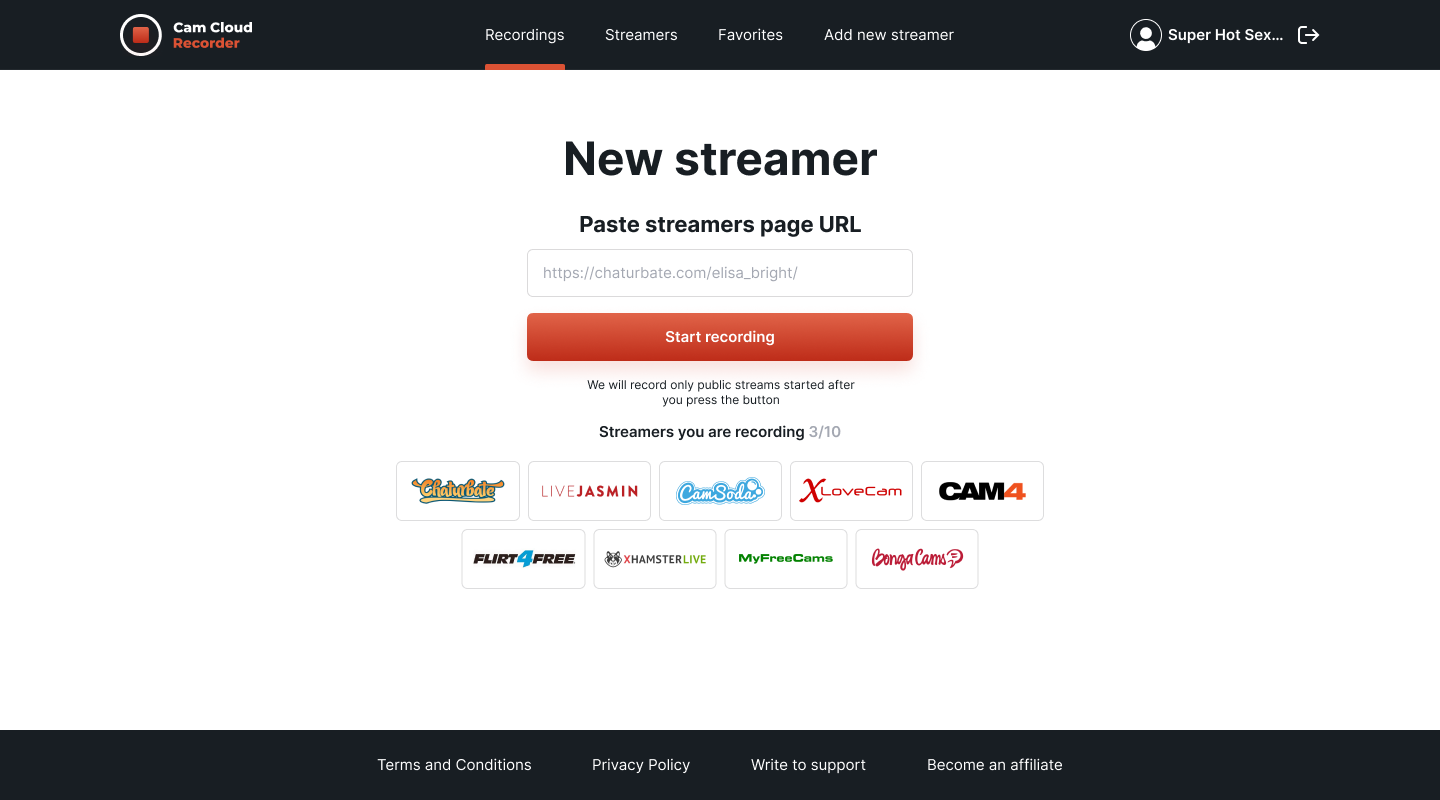
1. Add a Chaturbate Stream Link
Copy the broadcaster URL and paste it into your CamCloudRecorder dashboard.
2. Wait for the Broadcaster to Go Live
The service monitors the stream status automatically, so you do not need to keep the page open.
3. Watch or Download the Recording
After the stream ends, the completed video appears in your private archive.
Start recording streams automatically →What Is a Chaturbate Recorder?
A Chaturbate recorder is a tool that captures live Chaturbate streams and saves them as video files you can watch later. Since live broadcasts are not available as replays by default, a recorder helps users keep a private archive where recording is permitted.
CamCloudRecorder is a cloud-based Chaturbate recorder. It runs on remote servers, detects when selected broadcasters go live, starts recording automatically, and saves completed videos to your private cloud storage.
Why Use a Cloud Chaturbate Recorder?
Manual screen recording works only while you are present. Cloud recording is built for streams that start unpredictably, happen overnight, or overlap with other broadcasts.
Chaturbate Recording Features
Automatic Stream Detection
Recording starts when the broadcaster goes live.
24/7 Cloud Recording
Streams are monitored around the clock, even when your device is offline.
Multi-Stream Recording
Record multiple Chaturbate broadcasters simultaneously, depending on your plan.
Original Stream Quality
Recordings preserve the available stream quality, including HD when available.
Watch or Download
Open recordings in your browser or download them to your device.
Private Cloud Storage
Your recordings are stored in your private account and are accessible only to you.
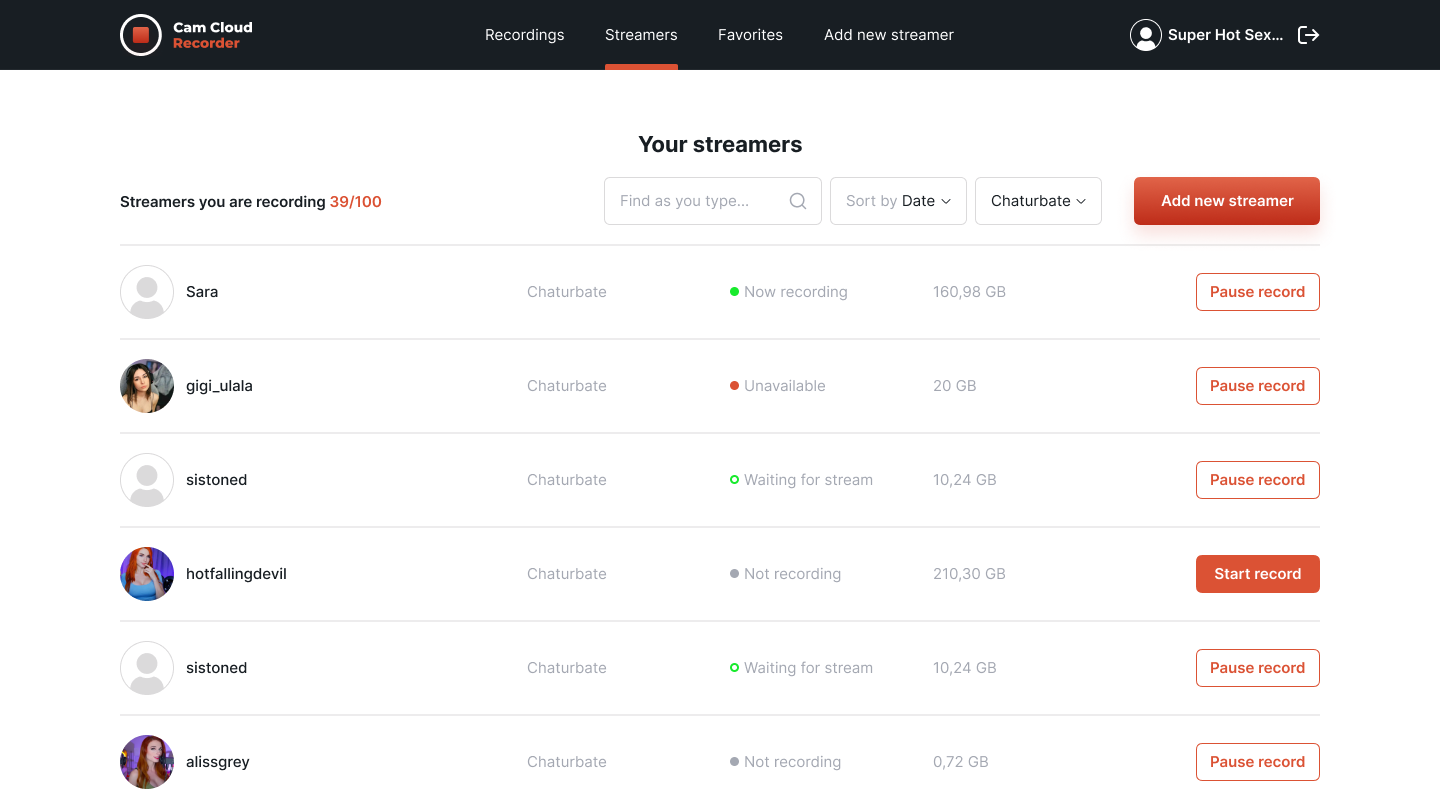
Private Cloud Archive
Completed recordings are saved to your account and can be streamed or downloaded later.
OBS vs Cloud Recording: Which One Should You Use?
OBS is useful when you want to manually record one stream while you are already watching it. It is free and flexible, but it depends on your computer, browser, internet connection, and disk space.
Cloud recording is better when you want to record automatically without waiting for the broadcaster to go live. It also works better for overnight streams, multiple broadcasters, and long-term archiving.
| Feature | Cloud Recorder | OBS / Screen Capture |
|---|---|---|
| Requires install | No | Yes |
| PC must stay on | No | Yes |
| Starts automatically | Yes | No |
| Records multiple streams | Yes | Hard to manage |
| Storage | Cloud archive | Local disk |
| Best for | Unattended recording | Manual one-off recording |
Record Multiple Chaturbate Streams at Once
CamCloudRecorder can monitor several broadcasters at the same time. Each stream is tracked independently, so if multiple models go live together, the recordings can run in parallel.
This is especially useful if you follow broadcasters in different time zones or do not want to choose which stream to capture manually.
Recording Quality: Cloud Capture vs Screen Capture
Screen recording captures what is rendered on your display and encodes it again. That can reduce quality, add artifacts, or create larger files than necessary.
Cloud recording is designed to capture the stream directly, so recordings can preserve the original broadcast quality without recording your screen.
Manage Recordings in a Private Cloud Archive
After a broadcast ends, the recording is added to your private archive. You can search by broadcaster, open the video in the browser, or download the file when you need a local copy.
This removes the usual local storage problems: no scattered files, no full hard drive, and no need to sync recordings between devices.
Common Problems with Manual Chaturbate Recording
- Missing the start of a broadcast
- Forgetting to press record
- PC sleep mode stopping the capture
- OBS or browser crashes during long sessions
- Local disk space filling up
- Difficulty recording several streams at once
Important Note Before Recording Chaturbate Streams
Before recording any stream, make sure your use follows the platform rules, broadcaster permissions, and the laws that apply in your location. Do not share, sell, repost, or distribute recordings unless you have the right to do so.
Private shows, paid content, restricted rooms, and any content limited by the broadcaster or platform should be treated especially carefully.
Also Record Other Live Streaming Platforms
CamCloudRecorder also supports other live streaming and cam platforms, including Twitch, YouTube Live, Kick, TikTok Live, CamSoda, MyFreeCams, Cam4, LiveJasmin, BongaCams, Streamate, and more.